
1. Choose a legitimate business and a relevant query
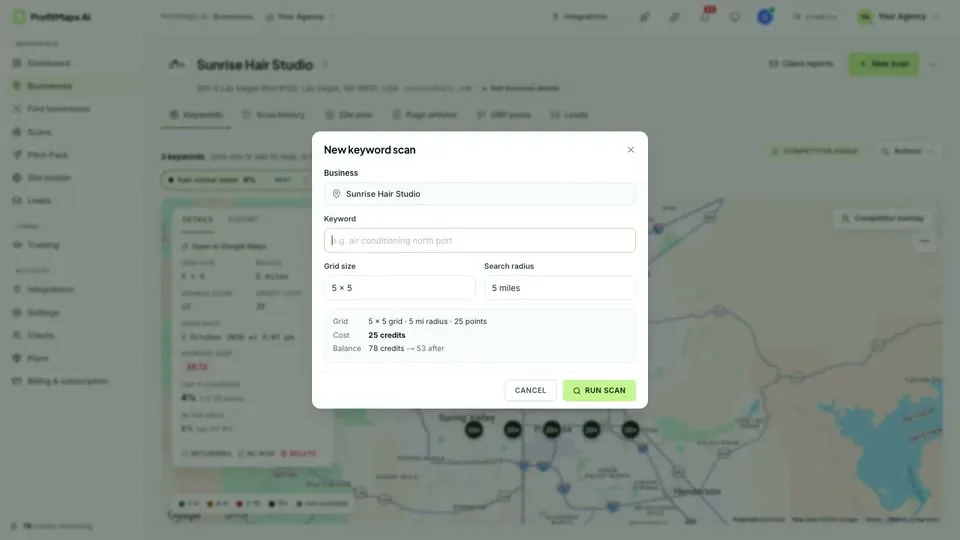
Start with an identifiable local business and an actual service it provides. A dentist and a restaurant have different intent, service areas and competitive environments. Check the location details and choose a query that describes a relevant customer need, not whichever keyword makes the map look most dramatic.
The vendor’s recording shows business workspaces, keyword selection and AI suggestions. Review suggested phrases manually. Basic is advertised with 10 customers and 2 keywords per customer, so prioritize those that are genuinely useful.
2. Set the grid, radius and credit budget
The default 5 × 5 grid covers 25 positions around a business. A selectable radius controls the area sampled. A wider radius can tell a different story from a tight neighborhood scan; neither configuration is automatically more representative for every business.
Look at the cost preview before running the scan. Confirm your real allowance and top-up terms first. For repeat monitoring, save the business, keyword, grid size, radius and scan date so later results are comparable.
3. Read the geography—not just a score
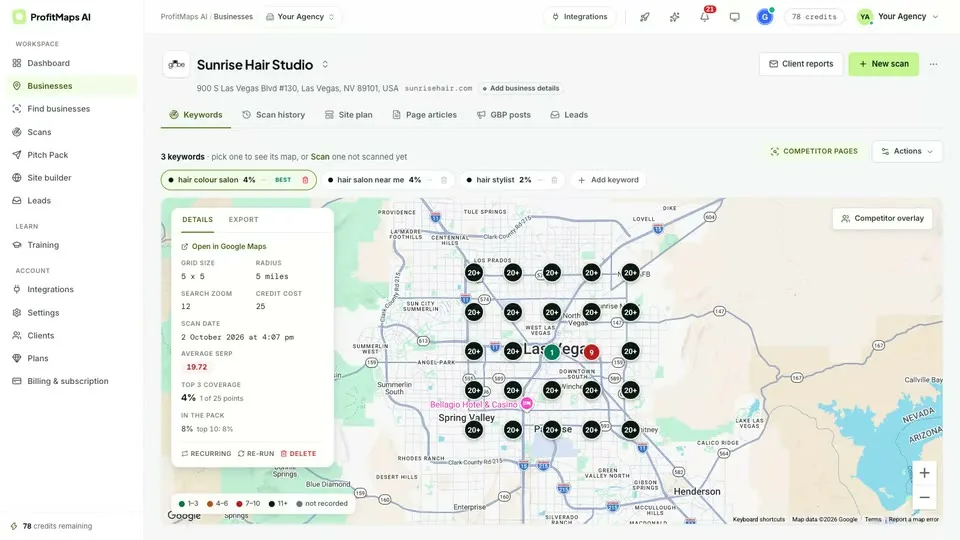
A top-three position near the address does not establish visibility across the entire service area. Check weak clusters, compare the query with the business category and investigate relevant competitors where the interface offers that detail.
Rank scans are observations affected by time, query and geography. A red point is not a measurement of lost sales. Do not present an average ranking or the Finder’s vendor-defined score as a calibrated probability of a successful campaign.
4. Convert findings into a deliverable plan
The demonstrated Actions menu can open an AI-written action plan. Use it as a starting point, then check whether the recommendations fit the profile, website, category and local competition. Generated recommendations are not a replacement for a competent local SEO assessment.
Separate diagnosis from fulfillment: you may still need to correct business information, improve site content, address citations and help the business seek legitimate reviews. Promise only work you can perform, not first-place rankings.
5. Prepare a client-facing explanation
A useful audit names the query and scan settings, explains the observations and outlines a prioritized service proposal. The vendor shows report branding, share-page and PDF settings; removal of attribution is identified as Pro.
Confirm export and white-label entitlements for the exact license. Label time-sensitive observations appropriately and do not reuse a vendor screenshot as if it were a scan you ran for your prospect.
6. Use website and outreach tools carefully
The platform’s website generator, page articles, profile-post drafts and lead-capture tools can support a website-led pitch. Basic advertises 10 generated sites. Review copy, contact information and consent language before making any generated page public.
The optional Business Finder can help filter prospects. Check each business manually before contact, make the message relevant and comply with applicable outreach rules. Automated follow-up does not justify unsolicited bulk promises.
What a sensible first trial looks like
- One business you understand and are authorized to assess.
- One relevant query with saved grid and radius settings.
- A known scan cost and export entitlement.
- A manually reviewed report with a realistic action plan.
- A comparison of time spent and usefulness—not just the map’s colors.
Review the pricing and credit checklist before purchase. If your primary goal is discovering businesses rather than understanding geographic visibility, read the LeadsGorilla comparison for the workflow distinction. Our main review ties these decisions together.