
Purchase links may earn us a commission at no extra cost to you. Our assessment is based on documented capabilities and purchase checks, not promised customer outcomes. Our editorial approach.
Quick answer: Using ProfitMaps AI for client services, putting your logo on a report, giving a customer a read-only portal and reselling the software are four different permissions. The vendor demonstration shows report-branding controls and identifies removal of software attribution as a Pro capability. The seller's current written terms allow client-service use within purchased limits, but prohibit sharing the main login and reselling the product itself; a later offer named “Agency” or “White Label” is not sufficient evidence of an exception.
The public release is advertised for October 21, 2026 at 11 AM EDT. This October 17 guide explains the available documentation, not a completed purchase or a tested agency account. Commercial purchase links may earn us a commission at no extra cost to you.
Commercial Use Is Not the Same as White-Label Access
Commercial use concerns the work you sell. For example, you might charge a client to interpret a geographic visibility scan and prepare a practical improvement plan. That does not automatically grant permission to distribute software accounts, conceal every third-party attribution or reuse map data without restrictions.
Report branding concerns presentation: your business identity, logo and agreed contact details on a client deliverable. White-label controls may remove software attribution from supported reports or share pages, but the precise output and purchased tier matter.
Agency access concerns who can enter the application and what each person may view or change. A client portal, an editor seat and a separately provisioned customer account are not interchangeable. Software resale is a further right that should never be inferred from the ability to invoice for your professional services.
The seller's current terms, checked October 17, draw an important boundary: the purchased licence covers your own business or clients you serve within plan limits, while the underlying software is not yours to redistribute. This is an explanation of published seller terms, not legal advice about a negotiated agreement.
What the Demonstrated Branding Settings Actually Show
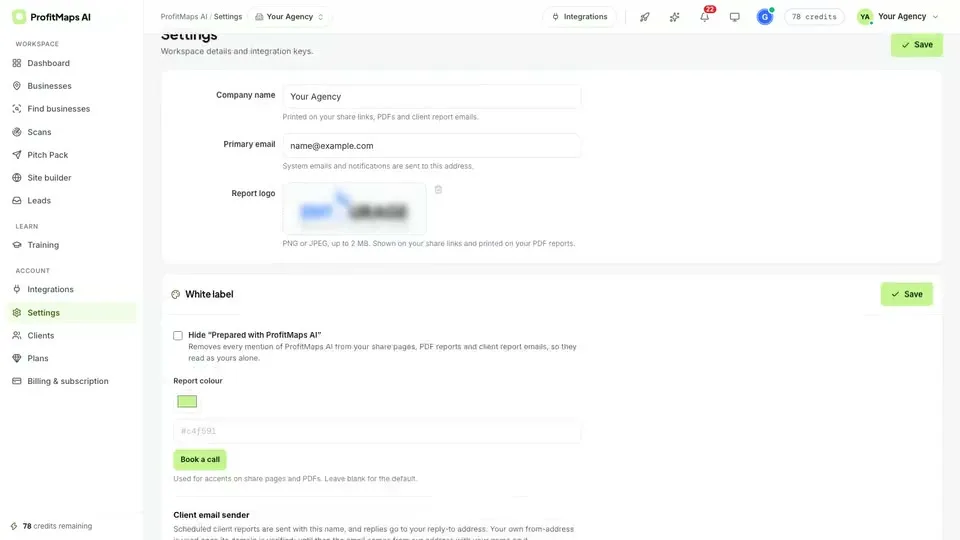
The recorded settings screen contains a company-name field, primary email, report-logo upload, report-colour control and software-attribution option. The visible upload guidance specifies PNG or JPEG, up to 2 MB, and describes use on share links and PDFs. These are concrete interface observations, not a guarantee that Basic exposes all controls.
The attribution control is labelled Hide “Prepared with ProfitMaps AI”. Its supporting description references share pages, PDF reports and client report emails. The demonstration identifies this as Pro functionality; confirm the final plan entitlement and inspect each actual output before offering an unbranded service to a customer.
A Practical Rebranding Checklist
Use your real trading identity and a contact address monitored by the people delivering the service. Upload a logo that remains legible against the report background. A complicated full-width agency banner may look worse than a simple mark in a compact report header.
If your purchased account exposes the demonstrated colour control, check its effect in both PDF and share-page views. A brand accent should improve readability, not obscure the ranking legend or make weak and strong positions difficult to distinguish. Do not recolour data to manufacture a more alarming sales story.
Save the configuration and export a sample for your own inspection. Check headers, footers, contact information, attribution, page breaks, email sender details and any booking link. A screenshot of the settings page alone does not prove that every downstream output inherited the change.
Branding Is Not a Claim About the Data's Origin
A report can carry your agency logo while honestly explaining that it uses third-party software and map data. Do not present sampled visibility as Google's own certification or claim that your agency independently collected every raw observation if it did not.
Keep the query, geographic coverage, scan timestamp and report limitations visible. Your value is in interpreting the evidence and delivering agreed work—not making the software disappear from the client's understanding of what was measured.
Which Tier Unlocks Which Rights?
Current public launch materials list Basic at $37, Pro at $67 and later named Agency and White Label offers. Some later prices are explicitly draft approximations. The sensible purchase question is narrower than “Which package has everything?”: which written entitlement covers the deliverable you actually need?
| Intended use | Current documentation | Purchase decision |
|---|---|---|
| Serve clients using your own account | Seller terms permit client work within purchased limits; Basic advertises 10 customers | Verify capacity, credits and output rights before promising a service |
| Remove software attribution from supported reports | Demonstration identifies the removal control as Pro functionality; Pro is advertised at $67 | Check the actual Pro licence and exported sample; do not assume Basic is enough |
| Give a client a read-only portal | Public demo describes an optional read-only portal in a client workspace | Confirm tier, authentication, isolation and what the client can see |
| Provide separately licensed customer accounts | Later White Label offer is described with 10 or 100 client accounts; approximate $297/$497 figures remain draft | Obtain the final written account rights and limits before selling access |
| Resell or share the main application | Current general terms prohibit product resale and making your login available to others | Do not assume any marketing label overrides those terms |
The draft Agency/Agency Plus row is separately listed around $147/$297. It must not be silently treated as the same offer as Pro, the later White Label row or a complete bundle. Gold and Platinum are alternative package routes, not proof that every entitlement is identical or unrestricted.
For the wider advertised funnel, use the ProfitMaps AI pricing and upgrade breakdown. This guide intentionally avoids reproducing every offer: licence clarity, not the longest upgrade list, determines whether you can deliver the promised service.
Team Members and Virtual Assistants: Do Not Share the Main Login
The current terms explicitly prohibit making your login available to others. The public material inspected for this guide does not establish a specific VA seat count, invitation workflow or role-permission matrix. We therefore cannot responsibly give a click-by-click team setup tutorial or tell you that Basic includes unrestricted assistants.
Before delegating in-app work, obtain written confirmation of whether your purchased licence provides separately authenticated team seats. Ask which role can create scans, view customer information, export reports, change billing, manage integrations and invite other users. Separate accounts matter because an agency owner should be able to revoke one person's access without changing everyone's credentials.
If authorised seats exist in the released plan, invite the assistant through that supported mechanism and give only the access needed for their task. Test visibility with non-sensitive sample material before assigning real clients. Do not mistake a read-only customer portal for an operator seat.
If team access is not confirmed, keep application operation with the licensed account holder. An assistant can still research a niche, prepare a public business brief or review an exported report within your contractual and data-handling obligations. That is different from sharing a password to run scans.
Our buyer FAQ provides a broader list of account and usage questions to resolve before scaling.
Build a Client Deliverable Worth Branding
Start with the business decision, not the logo. A useful client-facing audit explains the service query, area measured, observed pattern, limitations, recommended next action and the work your agency will actually perform. It distinguishes a visibility problem from its possible causes.
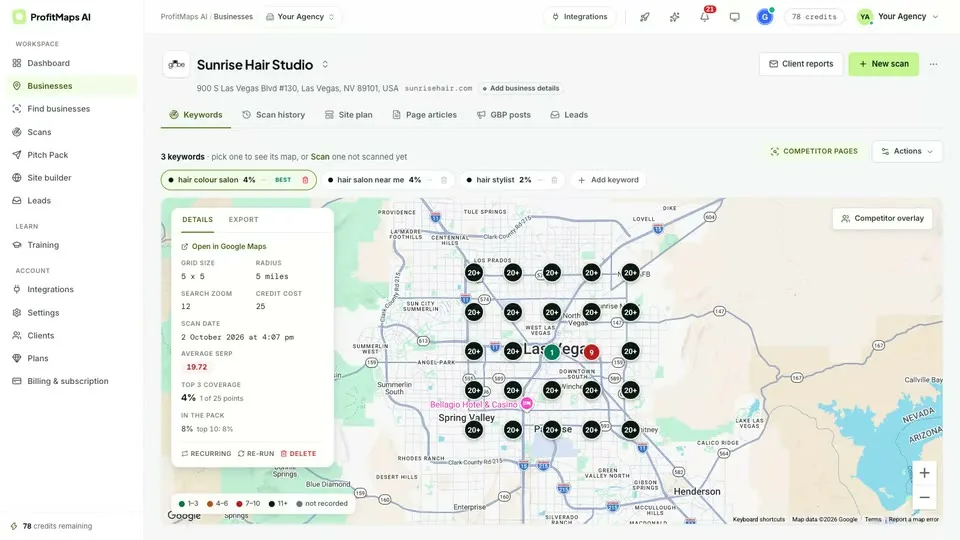
The vendor's results display can support that discussion, but one map is not a completed SEO campaign. Repeat scans need comparable settings; fulfilment may involve website work, accurate business information, review operations or other separately agreed tasks. Claim only the work included in your service scope.
Use the workflow guide to prepare a reproducible scan and review sequence. For what the software does well versus what an agency must still deliver, read our honest assessment.
Can Branded Heatmaps Justify a $500–$1,500 Monthly Retainer?
Branding can make a proposal consistent and easier to trust, but it does not establish a market-clearing fee or guarantee that a client will accept one. A retainer is justified by the agreed scope, expertise, delivery cost and continuing value—not by a larger logo on the same report.
Treat $500–$1,500 per month as hypothetical package-design examples, not verified ProfitMaps customer outcomes or a universal local-SEO price range. A limited monitoring-and-prioritisation service is a different engagement from producing content, making website changes and coordinating a multi-location campaign.
For illustration, a $500 monthly fee with $200 in delivery labour, $60 in tools/data and $40 in administration leaves $200 before other overhead and tax. At $1,500, costs may also increase substantially; it is not sensible to assume the same workload and extrapolate the margin. These are invented planning inputs, not market benchmarks.
A useful report makes the scope visible. Show what will be inspected each month, what changes are included, what requires separate approval and how success will be evaluated. Do not sell guaranteed rankings or suggest that a diagnostic scan performs the remediation automatically.
The agency retainer playbook explains how to connect an audit observation to a bounded service proposal without turning a heatmap into an earnings promise.
Before You Offer White-Label Audits to a Client
Prepare one internal sample and review it as the recipient would. Confirm that customer information is correct, unnecessary personal data is excluded and the intended branding appears consistently. Inspect a PDF on a small screen as well as a desktop display.
Record the purchased licence, account permissions, relevant usage limits and any written seller clarification. If a client asks to retain software access after the service ends, resolve that contractual right before promising it. A report delivery agreement should not silently become a software-account resale agreement.
The seller's published refund policy, checked October 17, describes a 30-day period for purchases and separately purchased upgrades or bundles, subject to its conditions. It also says software access and associated share links end after a refund. Do not build a long-term client delivery promise around access you intend to refund.
For related evaluation, see the ProfitMaps AI analysis on Launch Review Lab. It is an affiliated sister publication and documentation-based assessment, not independent proof that the agency functions were tested in a customer account.
Frequently Asked Questions
Does ProfitMaps AI Basic include full white-label reporting?
Do not assume that it does. The demonstration identifies software-attribution removal as a Pro capability, while Basic's advertised customer capacity does not establish every report-branding permission. Confirm the actual licence and inspect an exported sample before promising fully rebranded delivery.
Which upgrade should I inspect for removing report attribution?
Pro is the documented starting point for the demonstrated attribution-removal control and is advertised at $67. That is distinct from the later offer named White Label, which describes client-account options with draft pricing. The final offer and licence must confirm the exact output rights before purchase.
Can a virtual assistant use my main ProfitMaps AI password?
The seller's current general terms prohibit making your login available to others. Ask whether the released plan provides authorised, separately authenticated team seats and what each role can access. Do not use a shared password or read-only client portal as a substitute for an unconfirmed operator licence.
Can I resell ProfitMaps AI just because I buy an agency plan?
Not on the basis of a plan name alone. Current general terms distinguish branding client deliverables from reselling the underlying software, and later marketing descriptions do not by themselves resolve that restriction. Obtain explicit written rights for the exact offer before selling customer access or making a resale promise.